
Look beyond the main screen.
The screen changes when someone is waiting, nothing matches, or a service fails. Those situations need thinking through too.
The same screen can tell a different story
Ana needs to know who needs attention. Maria appears in the queue, but a missed reply and a reply that's still pending aren't the same situation. Looking at the main screen alone can hide that distinction.
Your agent connects supported states to the gallery with safe fixture data. Switch between the examples below and look at Maria's status, then compare the two views with no results.
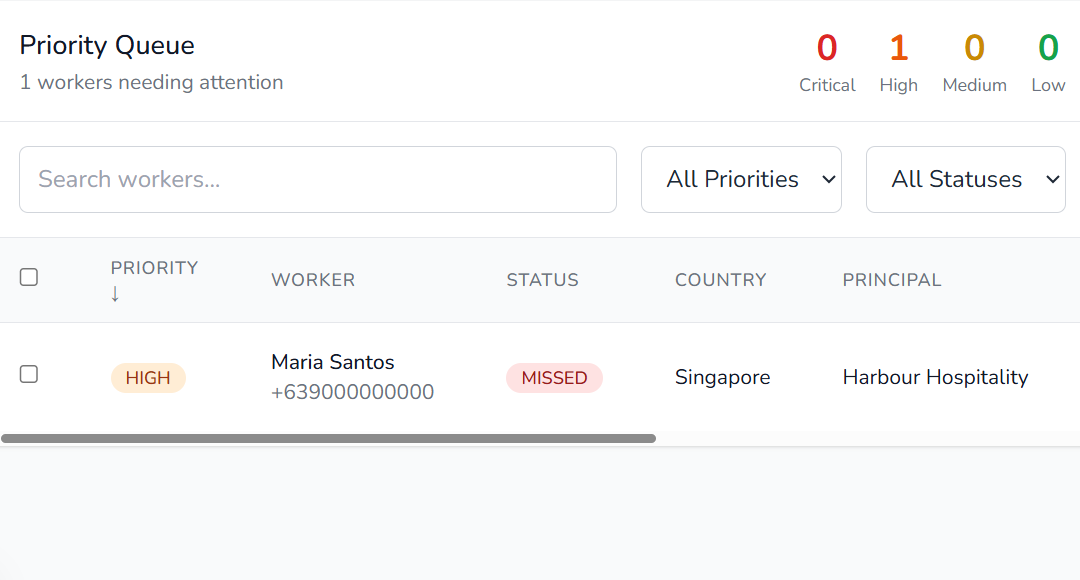
A small status change raises a bigger question
In Waiting, Maria is marked PENDING. That tells you what the screen shows. You still need to decide when a pending reply becomes missed, and what Ana should do at each point. Your agent keeps that rule alongside the brief and state map.
No results, or a failed service?
Empty shows no matching workers. Service failure adds an error, but still shows an empty results message. Seen together, the two views reveal something to work through: could Ana mistake a loading failure for nobody needing attention?
That's the value of comparing states. You can point to the exact wording or behaviour to discuss, then ask your agent to update the relevant logic and preview. An undecided rule stays an open question; an unavailable preview stays a visible gap.
Keep exploring
Seamling is a downloadable kit for your own project. Your agent sets up and maintains the work; you review and guide it.
Get the kitUS$29 · One-time purchase · Purchases are not open.